How to Choose (and Work With) a Church Website Designer
You’ve decided to hire someone to build your church website — smart, if you want a professional result without doing it yourself. But the church-web-design world is full of one-sided advice from companies selling their own service, and it’s easy to end up locked into a site you don’t own and can’t edit. This is your buyer-protection playbook: who you can hire, how to vet them, the exact questions to ask, and the red flags that should send you running. We sell templates, not design services, so there’s no agency we’re nudging you toward.
(Not sure you should hire at all? Start with our guide to DIY vs hiring a designer — this article is for once you’ve decided to hire.)
Who you can hire
| Option | Typical cost | Best for |
|---|---|---|
| Freelancer | $1,500–$8,000 build + ~$10–$120/mo | Affordable, personal; usually builds on an open platform you keep |
| Agency | $8,000–$40,000+ + retainer | Strategy, branding, accountability — larger churches |
| Church design company | ~$1,000–$10,000 + monthly | Church features built in — but the highest lock-in risk |
| Done-for-you service | $0–$200+/mo, ongoing | Cheapest and fastest — but you rent, you don’t own |
For most small and mid-size churches, a freelancer hits the sweet spot — a custom site, on a platform you own, for a one-time fee plus light ongoing care. Treat these as typical 2026 ranges and get real quotes for your project; our church website cost guide breaks the numbers down further.
How to vet a designer
Before money changes hands, do your homework. Look at their portfolio — do they have actual church clients, and do those sites still look current and load fast today (click through and check)? Talk to a reference or two — ask past church clients about deadlines, responsiveness, and surprise costs. And settle the single most important issue up front: ownership. By default, a designer often owns what they create unless the contract transfers it to you, so get written transfer of the domain registrar, hosting, and CMS logins. Confirm the platform isn’t a proprietary box you can’t export from, that your team can edit the site after launch, and that SEO, mobile-responsiveness, and accessibility are part of the build, not surprise upsells.
The questions to ask — and the red flags
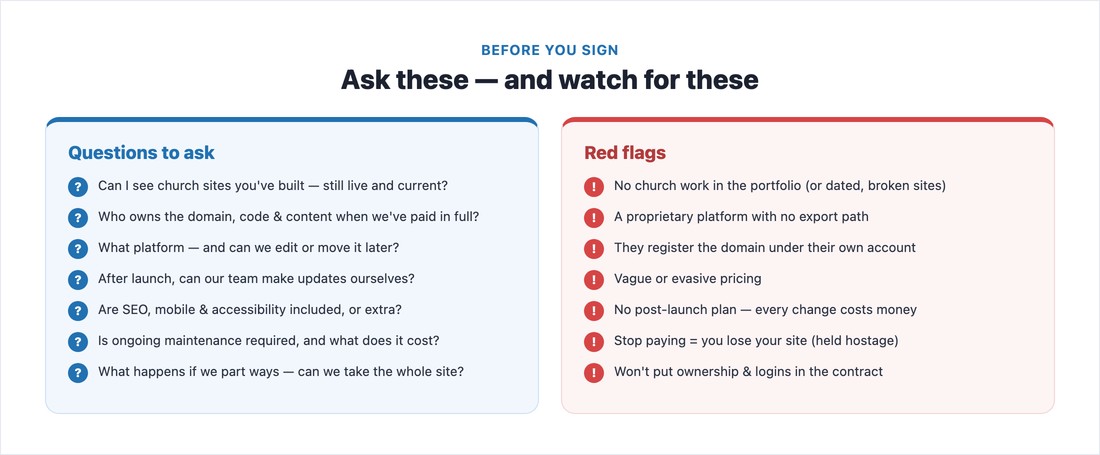
Bring this list to every conversation:
- Can I see church websites you’ve built — and are they still live and current?
- Who will own the domain, code, design files, and content when we’ve paid in full?
- What platform will you build on — and can we edit it or move it to another provider later?
- After launch, can our team make updates ourselves, or do all changes go through you?
- Are SEO, mobile-responsiveness, and accessibility included, or extra?
- Where will the site be hosted, and will we hold our own admin and registrar logins?
- What’s the timeline, and what do you need from us (copy, photos) to hit it?
- How many revision rounds are included?
- Is ongoing maintenance required or optional — and what does it cost per month?
- What happens if we decide to part ways — can we take the full site with us?
- Can you share two church client references we can contact?
And the warning signs that should give you pause: no church work in the portfolio (or church sites that look dated or broken), a proprietary platform with no export path, a designer who registers your domain under their own account, vague or evasive pricing, no post-launch plan (every change costs money), an arrangement where stopping payment means losing your site, and any reluctance to put ownership and credential transfer in the contract. None of these are automatically disqualifying, but each deserves a straight answer before you commit.
Give them a good brief
The clearer your brief, the better (and faster) the result. Hand your designer: your goals (what the site must do — plan-a-visit, giving, sermons), a rough sitemap, the content you’ll supply, your brand assets (logo, colors, photos), two or three example sites you like and why, your budget range, and a hard deadline (a launch Sunday, Easter, Christmas). The more you bring, the less you pay for the designer to guess.
Working well together
One truth surprises every church: content is almost always the bottleneck. Designers can build fast, but they’re waiting on your copy and photos — so gather those before kickoff. Assign one decision-maker so the designer isn’t chasing a committee, give consolidated feedback (one batched list, not a trickle of emails), and respect the number of revision rounds in your agreement. A great working relationship is as much about your responsiveness as theirs. If you’re rebuilding rather than starting fresh, our church website redesign playbook covers the migration side, and our builders roundup helps if you’re weighing a self-managed platform instead.
📄 Free download: The Designer Hiring Checklist + Questions (PDF) — who to hire and what it costs, the 11 questions, the red flags, and the brief to hand them, on one page.
The bottom line
Hiring well comes down to two things: pick someone with real church experience, and protect yourself on ownership before you sign. Ask the eleven questions, watch for the red flags, insist that you own your domain, content, and site, and bring a clear brief. Do that, and you’ll get a professional church website you control for years — not a rental you can never leave.
Frequently asked questions
What questions should I ask a church website designer?
The essentials: Can I see live church sites you’ve built? Who owns the domain, code, and content when it’s paid for? What platform, and can we edit or move it later? Can our team update it ourselves? Are SEO, mobile, and accessibility included? What’s the maintenance cost? And what happens if we part ways — can we take the whole site? Always ask for two church references too.
Who owns my website after a designer builds it?
Not automatically you. By default, a designer often retains rights to what they create unless the contract transfers ownership. Get written transfer of the domain registrar, hosting, content, and CMS admin logins, and make sure the site is on a platform you can access and move. This is the single most important thing to settle before you sign.
Should a church hire a freelancer or an agency?
Most small and mid-size churches are best served by a freelancer — a custom site on a platform you own for a one-time fee plus light ongoing care, typically $1,500–$8,000. Agencies cost more ($8,000+) but add strategy, branding, and accountability, which larger or multi-ministry churches may need. Church-specific design companies bundle church features but carry the highest lock-in risk.
Can I edit my church website myself after it’s built?
Only if you arrange it. Ask explicitly whether your team can make updates (service times, sermons, events) after launch, or whether every change must go through the designer for a fee. The safest setup is a site built on a platform you can log into and edit — confirm this before hiring, not after.