How to Speed Up Your Church Website (Core Web Vitals Guide)
Someone searches “church near me” on their phone on a Sunday morning, taps your site… and waits. And waits. Then taps the next result. A slow website quietly loses the exact visitor you most want to reach — and it gently drags down your search rankings too, because Google measures speed. The good news: most church-site slowness comes from a handful of fixable causes, and you don’t need to be a developer to fix them. Here’s the plain-English, platform-neutral guide.
Why speed matters for churches
Most church website visits happen on a phone, often Sunday morning with a high-intent question — what time is the service, where do I park, is there childcare. Over half of mobile visitors abandon a page that takes more than about three seconds. Every one of those is a first-time visitor who never made it to your service times. Speed is also a genuine Google ranking signal through Core Web Vitals — not the biggest factor, but a real tiebreaker, especially in the low-competition local searches churches compete in. And a fast site is simply more hospitable to older members, low-end phones, and slow rural connections.
Core Web Vitals in plain English
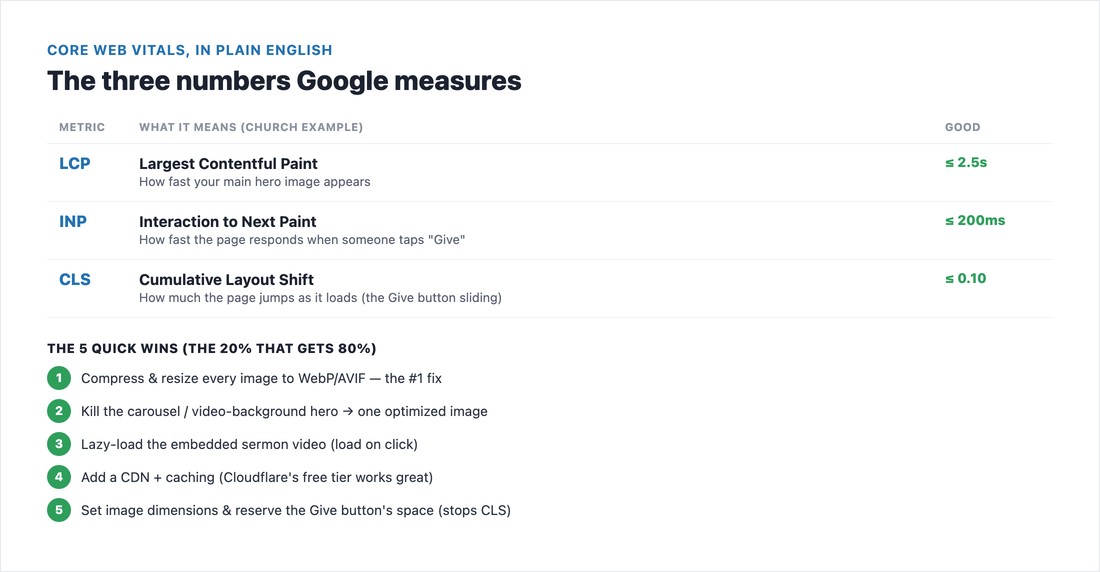
Google grades three things. LCP (Largest Contentful Paint) is how fast your main content — usually the hero image — appears; aim for 2.5 seconds or less. INP (Interaction to Next Paint) is how quickly the page responds when someone taps a menu or your “Give” button; aim for 200 milliseconds or less. CLS (Cumulative Layout Shift) is how much the page jumps around as it loads — the “Give” button sliding just as a finger comes down; keep it 0.10 or less. One note for accuracy: INP replaced the old FID metric in 2024, so ignore any guide still talking about “First Input Delay.”
How to test your site (free)
Start with PageSpeed Insights (pagespeed.web.dev) — paste your URL and read the mobile score, since that’s what Google grades and what your Sunday visitors use. For ongoing monitoring, the Core Web Vitals report in Google Search Console is the one that actually affects ranking, because it uses real-visitor “field” data over 28 days rather than a single lab test. Small church sites sometimes see “not enough data” in the field report — that’s normal; lean on the lab score and don’t panic over one number.
The fixes — in priority order
1. Images — fix these first. The number-one cause of slow church sites is volunteers uploading 4–8MB phone photos straight into a hero slider. Resize images to the size they’re actually displayed (a full-width hero rarely needs more than ~2000px wide), compress them (TinyPNG, Squoosh) to modern WebP or AVIF format, lazy-load anything below the fold (but never the hero), and always set width and height so the page doesn’t jump. This single step fixes most LCP and layout-shift problems.
2. Cut the bloat. Every social-media feed widget, live chat, donation pop-up, and extra font loads its own code. Keep plugins lean, remove what you don’t use, and limit yourself to one or two font families. 3. Replace the carousel/video hero. The auto-playing background video and the six-slide image carousel are church-site clichés that destroy performance — one optimized static image with a clear call-to-action loads far faster and converts better. 4. Add a CDN and caching (Cloudflare’s free tier plus a caching plugin on WordPress; builders do this automatically). 5. Tame heavy embeds — a single embedded YouTube sermon player can load 500KB before anyone presses play, so lazy-load it (load on click) and do the same for Google Maps.
By platform
How much control you have varies, but images are your biggest lever on every platform. On WordPress you have the most control: add a caching plugin, an image-optimization plugin (ShortPixel, Imagify, or Optimole to auto-convert to WebP/AVIF), Cloudflare, keep PHP current, and limit plugins. On Squarespace and Wix you can’t add caching (it’s built in), so your levers are compressing and resizing images before you upload them, using fewer blocks/sections, and limiting custom fonts and apps. On Tithe.ly and other church builders, lean on the platform defaults and stay disciplined about image sizes. Picking a platform? Our church website builders roundup covers the trade-offs.
Mobile and the “Give” button
Optimize for mobile first — it’s what Google scores and what your visitors use. Make sure your most important call-to-action (“Give,” “Plan a Visit,” “Service Times”) is visible without scrolling and doesn’t shift under a tapping finger as the page loads — reserve its space so it can’t move. A fast, stable Give button means more completed gifts and more planned visits. Speed is one piece of being found; see the full picture in our church website SEO guide.
📄 Free download: The Church Website Speed Checklist (PDF) — how to test, the fix-in-this-order list, and the platform-specific tips on one page.
The bottom line
You don’t need to chase a perfect 100 score. Do the five things that matter most — compress your images, drop the carousel, lazy-load the sermon video, add a CDN and caching, and stop the layout from shifting — and most church sites jump from “Poor” to “Good” on mobile. That’s the difference between losing the Sunday-morning searcher and welcoming them in. Then run your site through the full church website checklist to catch anything else.
Frequently asked questions
Why is my church website so slow?
Almost always oversized images — large, uncompressed photos uploaded straight into a hero slider — plus too many widgets and embeds, an auto-playing video background, and cheap hosting with no caching or CDN. Compressing and resizing your images is the single biggest fix for most church sites.
How fast should a church website load?
Aim for under three seconds on mobile, ideally one to two. In Core Web Vitals terms, target an LCP (when your hero appears) of 2.5 seconds or less, an INP (tap responsiveness) of 200 milliseconds or less, and a CLS (layout shift) of 0.10 or less.
Does website speed affect church SEO?
Yes. Core Web Vitals are a confirmed part of Google’s page-experience ranking signals. They’re not the biggest factor, but they act as a tiebreaker — and in the low-competition local searches churches compete in (“church near me”), a fast, stable site can be the edge that wins the click.
Do I need a CDN for a church website?
It helps and it’s often free. A CDN (like Cloudflare’s free tier) serves your images from a server near each visitor, speeding up load times. On WordPress it’s worth adding alongside a caching plugin; on Squarespace, Wix, and Tithe.ly, caching and a CDN are built in, so focus your effort on optimizing images instead.