Church Website Features
It’s one of the most common church-tech questions — and most of the answers come from companies selling either an app or a website, so they’re rarely neutral. Here’s the honest version: a church website and a church app do two completely different jobs. Your website is your public front door — found on Google, built for first-time guests, no download required. An app is an engagement tool for people who already attend — push notifications, giving, and content for the committed. You almost always need the website first; an app only earns its place once you have an engaged base to serve.
This guide breaks down exactly what each one does, a checklist for whether you actually need an app, the right order of operations by church size, what the options cost, and the honest case for when an app is a waste of money. There’s a free decision-guide PDF near the end.
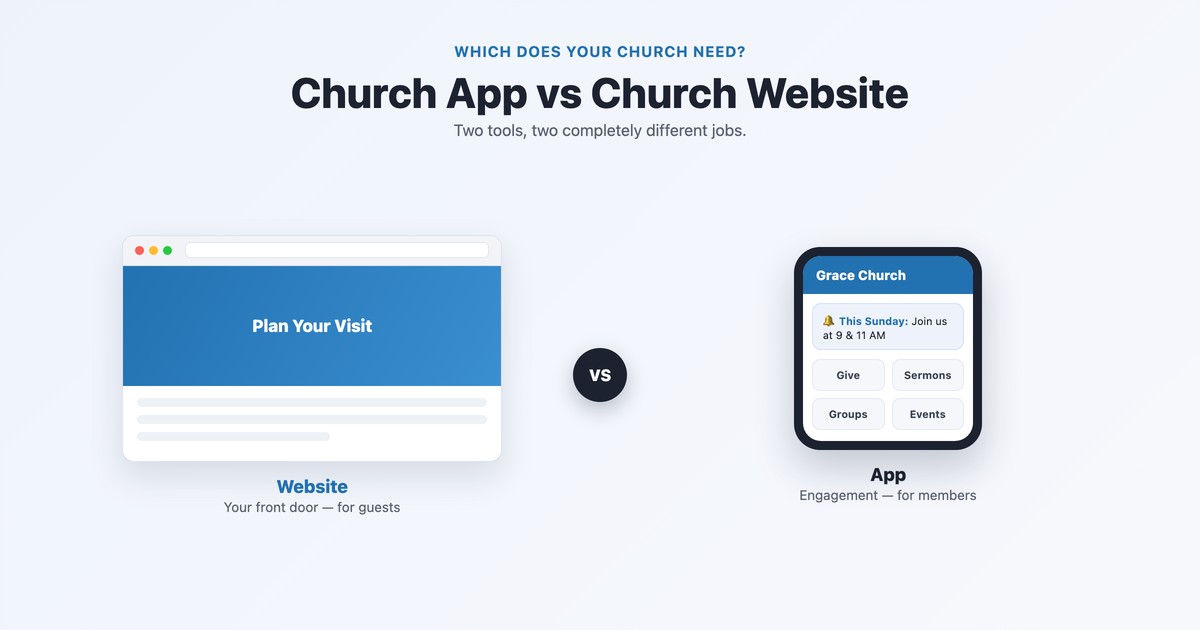
The quick answer: Nearly every church needs a website — it’s how new people find you and decide to visit. Most churches do not need a custom app, at least not yet. A mobile-friendly website plus the free Church Center app covers what the vast majority of churches think they need an app for. Build (or hire for) a custom app only once you’re large and engaged enough that people will actually download and use it.
The reason “app vs website” is the wrong framing is that they’re not competing for the same job. One is for outreach — reaching people who don’t know you yet. The other is for inreach — engaging people who already do.
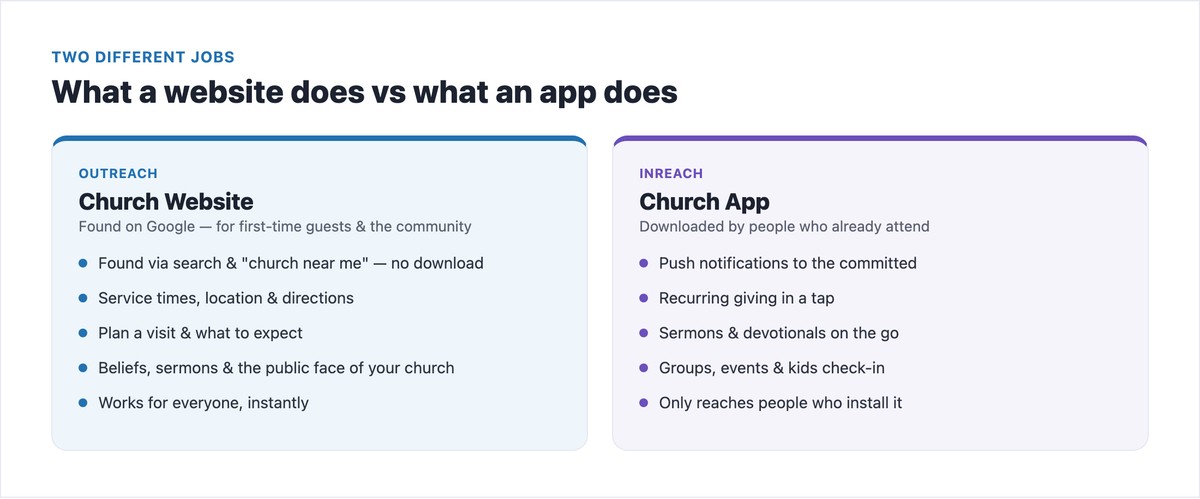
Your website is the front door. People find it on Google when they search “church near me” or your church’s name — no download, no friction. It’s where a first-time guest checks your service times, location, what to expect, and your beliefs before deciding to visit. It serves everyone, instantly, and it’s the foundation of your local search visibility. Every church needs this.
An app is the engagement hub for the already-committed. Its superpowers are push notifications, recurring giving in a tap, sermons and devotionals on the go, groups, event sign-ups, and kids check-in. But there’s a catch the website doesn’t have: someone has to hear about it, find it in the app store, download it, and keep it. If they don’t, the app reaches no one. That single difference drives the entire decision.
Before you spend a dollar on a custom app, you should be able to tick most of these boxes. If you can’t, your money and energy belong in your website, email, and SMS instead.
The right move maps almost directly to how many engaged people you have to serve. Here’s the order of operations.
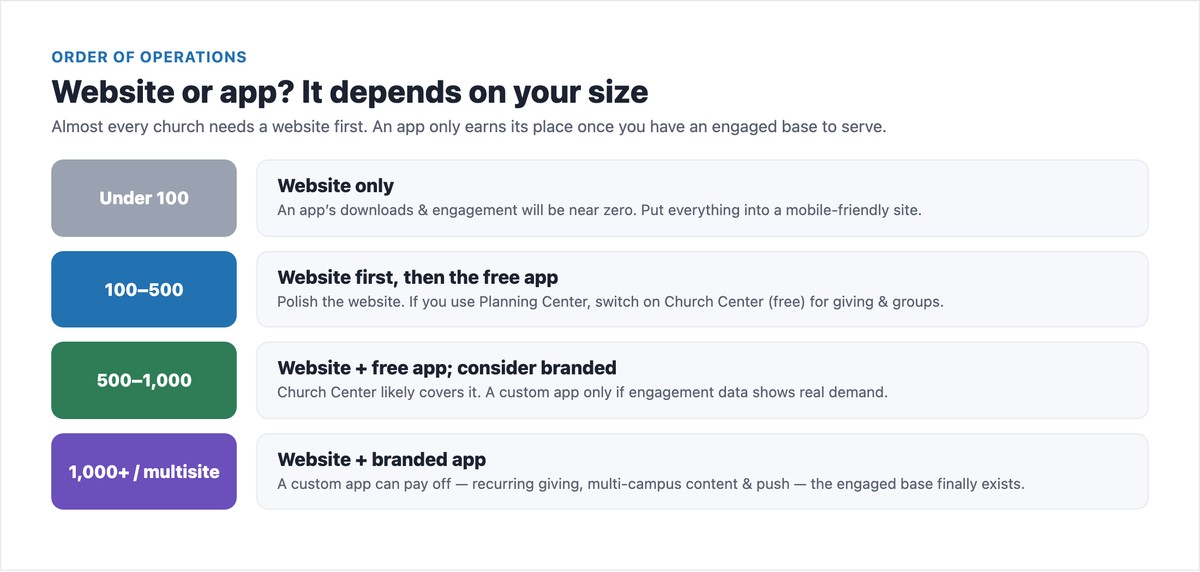
Notice the pattern: the website is non-negotiable at every size; the app is a “later, maybe” that scales with your engaged audience. If you haven’t built the website yet, start with our complete guide to building a church website and the best church website builders.
If you’ve decided an app is right, here are the main options and what they cost — from free to six figures.
| Option | Best for | Rough cost |
|---|---|---|
| Church Center (Planning Center) | The free, ready-made app most churches actually need | Free with a Planning Center subscription |
| Tithe.ly Church App | A cheap branded entry point bundled with their suite | ~$89/mo branded |
| Subsplash | The big custom-branded platform, modular add-ons | Reported ~$149–$600+/mo (quote-based) |
| Pushpay | Enterprise giving + app for large churches | Reported $500–$1,000+/mo (quote-based) |
| PWA / “add to home screen” | An app-like icon with no app store and no download friction | ~$0 on top of your site |
| Custom native app | A bespoke build for very large ministries | $50k–$270k + ongoing |
The headline: before paying any app vendor, check Church Center — it’s free with Planning Center and covers what most churches think they need a paid app for. For the donation side specifically, see our guide to church online giving.
Here’s the part the app vendors won’t tell you. For most churches — especially under a few hundred people — a custom app is a net negative. The reasons are practical, not anti-technology:
None of this means apps are bad — it means an app is a tool for a specific situation (a large, engaged congregation), not a default every church should buy.
If you use (or are willing to use) Planning Center for your church management, you already have access to Church Center — a free, polished app your members can download today. It handles giving, groups, event sign-ups, kids check-in, and church directories, pulling from your Planning Center data, with no extra app-building cost. For the large majority of churches asking “do we need an app?”, the honest answer is: you need a great website, and Church Center is the free app you were about to pay someone to build. Reserve a custom-branded app for when you’ve genuinely outgrown it.
Free download: Not sure which way to go? Grab the “Do You Need a Church App?” Decision Guide (PDF) — the checklist, the order-by-size plan, and the app options and costs, on one printable page.
Whichever direction fits your church, your website comes first. Make sure it nails the basics with our guides to the essential church website features and a strong homepage.
Probably not a custom one — at least not yet. Nearly every church needs a website, but a custom app only makes sense once you have a sizable, engaged congregation (realistically 300–500+ engaged adults) who will actually download and use it. For most churches, a mobile-friendly website plus the free Church Center app covers what they’d want an app for. Build a custom app only when you can tick the demand, capacity, and budget boxes.
They’re not better or worse — they do different jobs. A website is better for reaching new people: it’s found on Google, needs no download, and welcomes first-time guests. An app is better for engaging existing, committed members with push notifications, giving, and content. If you can only have one, have a website — it’s the front door everyone uses, and an app reaches no one who hasn’t already downloaded it.
It ranges enormously. The free Church Center app (with a Planning Center subscription) costs nothing extra. A branded app through Tithe.ly starts at $89/month. Subsplash and Pushpay are quote-based and publish no pricing — churches report roughly $149–$600+/month for Subsplash depending on features, and $500–$1,000+/month for enterprise platforms like Pushpay. A fully custom native app built by an agency can cost $50,000–$270,000 upfront plus ongoing maintenance. Most churches should start with the free option.
A website, without question. For a church under a few hundred people, an app’s downloads and engagement will be very low, so the money is far better spent on a mobile-friendly website that helps new people find and visit you. Once your website is solid and you have a larger engaged congregation, you can add the free Church Center app — and consider a custom one only beyond that.
For most churches it’s Planning Center’s Church Center, which is free with a Planning Center subscription and handles giving, groups, events, kids check-in, and directories. There’s also a “PWA” route — making your mobile website installable as a home-screen icon — which gives an app-like experience with no app store and no cost on top of your site. Both let a church offer an app experience without paying an app-builder.
For most churches, yes. A modern, mobile-friendly website delivers service times, directions, sermons, online giving, and event info in the browser with no download required — covering the core needs a small or mid-size church would otherwise want an app for. What a website can’t replicate is push notifications and the convenience of a downloaded icon for daily engagement, which is why large, highly-engaged churches eventually add an app on top of (never instead of) their website.

Church Website Features
Church Website Features
Church Website Features
10 complete church website templates, MIT licensed. Browse every demo freely; we will email you whichever folder you want.
All templates