Church Website Examples
Your church might have an amazing youth ministry — passionate leaders, fun events, deep relationships, life-changing conversations. But if your website’s youth page is a single paragraph with a stock photo of teenagers jumping in the air, nobody will know. Parents won’t feel confident dropping off their kids. Students won’t feel like the youth group is for them. And visitors with teenagers will skip your church entirely.
For broader design inspiration, browse our gallery of the best church website designs.
A youth ministry page (or section) on your church website needs to speak to two audiences simultaneously: parents who need to trust you with their kids, and students who need to feel like this isn’t going to be boring. Here’s how to build a youth ministry web presence that serves both.

This is the single most important element. Students can spot a stock photo of “diverse teens having fun” from a mile away — and it instantly signals that this page isn’t real. Use actual photos from your youth group: game nights, worship, service projects, summer camp, casual hangouts. The photos don’t need to be professional quality — they need to be authentic.
Get permission before posting photos of minors on your website. Have a photo release form that parents sign at registration. Some parents will opt out, and that’s their right. But you need real photos of real students to make this page work.
Lead with what’s happening, not a philosophical statement about your youth ministry approach. Students and parents want to know: When does youth group meet? What’s coming up next? Is there a retreat, camp, or special event on the horizon?
Feature your next 2-3 upcoming youth events prominently. Include the date, time, location, and what to bring. Link to your full event calendar for more. An active event schedule communicates that your youth ministry is alive and thriving.
Your youth ministry probably communicates more through Instagram than through the church website — and that’s fine. Make the connection between website and social media seamless. Feature your youth ministry Instagram feed on the page (or link prominently to it). Students are more likely to follow your Instagram than bookmark your website, so make Instagram the ongoing connection point and the website the information hub.
Parents have different questions than students. Create a clear parent section (or a dedicated parent subpage) that addresses:
Parents who feel informed and confident about safety are more likely to bring their students — and keep bringing them. See our essential pages guide for how this fits into your overall site structure.
A 60-90 second video of your youth ministry in action communicates more than any amount of text. Show real moments: students laughing during games, worshipping together, serving in the community, hanging out before and after youth group. Keep it energetic and authentic. The youth pastor can do a brief welcome in the video, but the focus should be on the students and the experience.
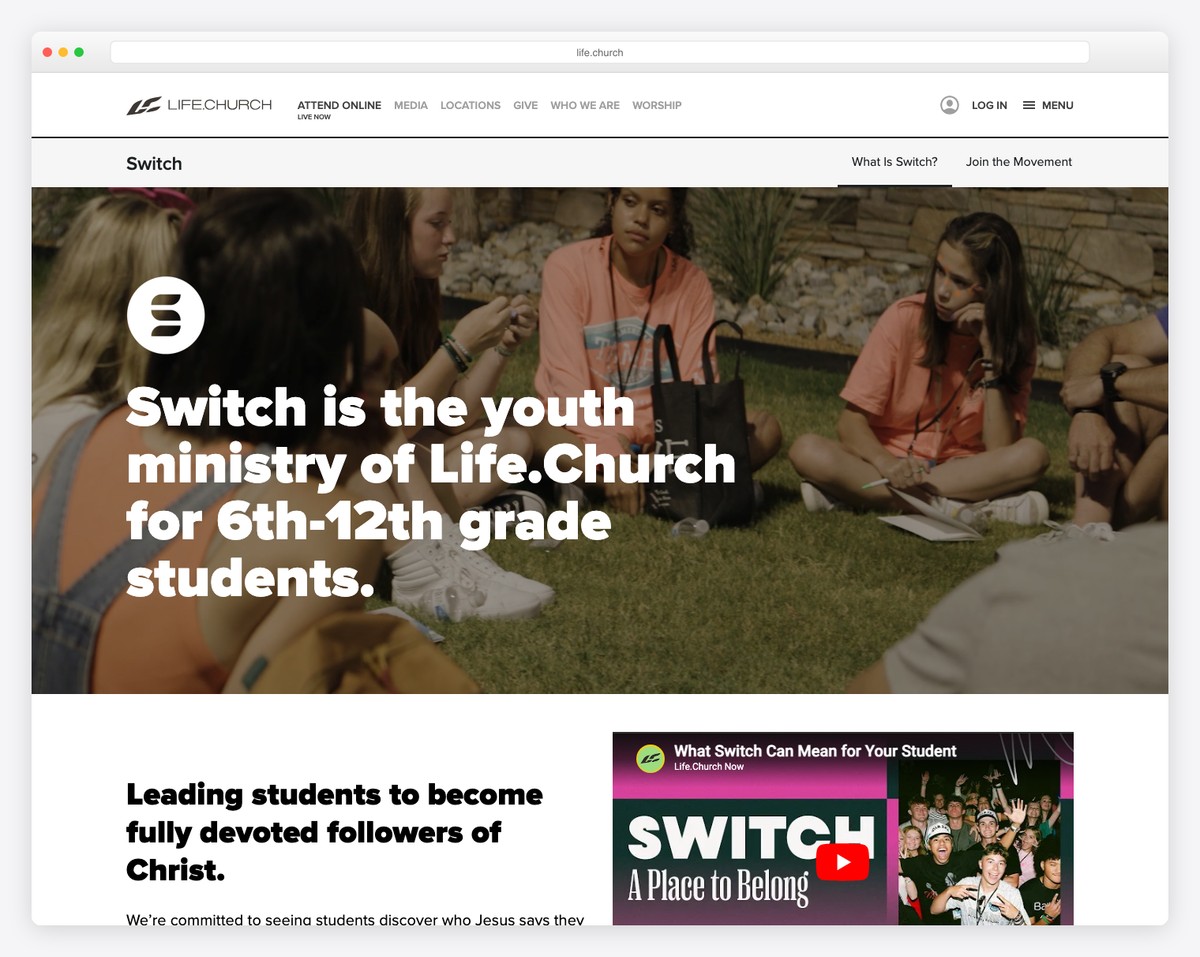
Your youth page can (and should) look different from the rest of your church website. Bolder colors, larger text, more dynamic layouts, and a more casual tone are all appropriate. This signals to students that the youth ministry has its own identity within the church. If your church website uses muted navy and cream, your youth section might use bright orange and teal — still cohesive with the church brand, but with its own energy.
Students won’t read a 500-word essay about your youth ministry philosophy. They’ll look at photos, watch a video, and scan the event schedule. Keep text short — bullet points, not paragraphs. Use images to tell the story. Every section should be scannable in seconds.
A quote from a real student carries more weight than anything your youth pastor writes. “I was nervous my first night, but everyone was super welcoming. Now youth group is the highlight of my week.” — Sarah, 10th grade. Get permission, use first names only, and feature 2-3 short quotes on the page. Parents and prospective students both respond to peer voices.
Teenagers are almost exclusively on phones. Your youth ministry page must look great and function perfectly on a mobile screen. Large tap targets, vertical scrolling layouts, easy-to-read text, and fast-loading images are non-negotiable. Test the page on an actual phone — not just a desktop browser’s mobile preview.
Include a brief “New to Youth Group?” section that addresses the anxiety of showing up for the first time. What happens when you walk in? Will someone greet you? Do you need to know anyone? Where exactly is the youth room? Consider including a photo of the entrance or building with directions. First impressions determine whether a student comes back.
Here’s a recommended structure that balances student appeal with parent information:
Look at how these churches handle their youth presence online for inspiration:
Notice that the best youth ministry pages have their own visual identity — a sub-brand within the larger church brand. They don’t look like a generic subpage — they feel like their own thing.
No. A separate website creates maintenance burden, fragments your church’s online presence, and confuses visitors. Your youth ministry should be a well-designed section or page within your main church website. If the youth ministry needs more independence, consider giving it its own Instagram account (where students actually engage) and a dedicated page on the church site.
If your youth ministry has separate programs for middle school (6th-8th grade) and high school (9th-12th grade) with different meeting times and activities, separate pages or clearly divided sections make sense. If they meet together, one page works. The key is helping parents quickly find information relevant to their child’s age group.
Create a photo/media release form that parents sign during youth group registration. The form should specify where photos may be used (website, social media, print materials). Offer an opt-out for families who don’t want their student photographed. Keep signed forms on file. When in doubt about a specific student, don’t post their photo. For broader website considerations, review our security guide.
A brief mention of what you’re currently studying adds value — “This semester we’re working through the book of James.” But detailed curriculum outlines are more than most visitors need. Parents who want depth can ask the youth pastor directly. Keep the page focused on the experience, not the syllabus.
Any platform that your main church website runs on — Squarespace, WordPress, Tithe.ly, or Wix — can handle a youth ministry page. The platform doesn’t matter nearly as much as the content. Authentic photos, current events, clear information, and a welcoming tone will make any platform work. See our builders comparison if you’re evaluating platforms.

Church Website Examples

Church Website Examples
Church Website Examples
10 complete church website templates, MIT licensed. Browse every demo freely; we will email you whichever folder you want.
All templates