Church Website Photography: How to Get Photos That Build Trust
A first-time visitor decides whether to walk through your doors partly based on what they see on your website — and nothing sinks that decision faster than fake-looking stock photos of strangers. Real, warm photos of your actual church do the opposite: they let a nervous newcomer picture themselves there before they ever arrive. This guide covers why real beats stock, the exact shots your website needs, how to get them, how to size them for the web, and how to handle consent — especially for kids.
Why real photos beat stock
Most people spot stock photography instantly — the same smiling, suspiciously diverse “congregation” also appears on a dentist’s site and a gym ad. For a church, where authenticity is a core value, showing people who aren’t your people quietly reads as false advertising. Your photos should match your words: if you say “the church is the people,” show real people; if you say “everyone’s welcome,” show genuine variety in age, ethnicity, and ability — candidly, not staged. Real faces and real moments signal a living, active church and let a visitor mentally check in before Sunday.
The shot list your website needs
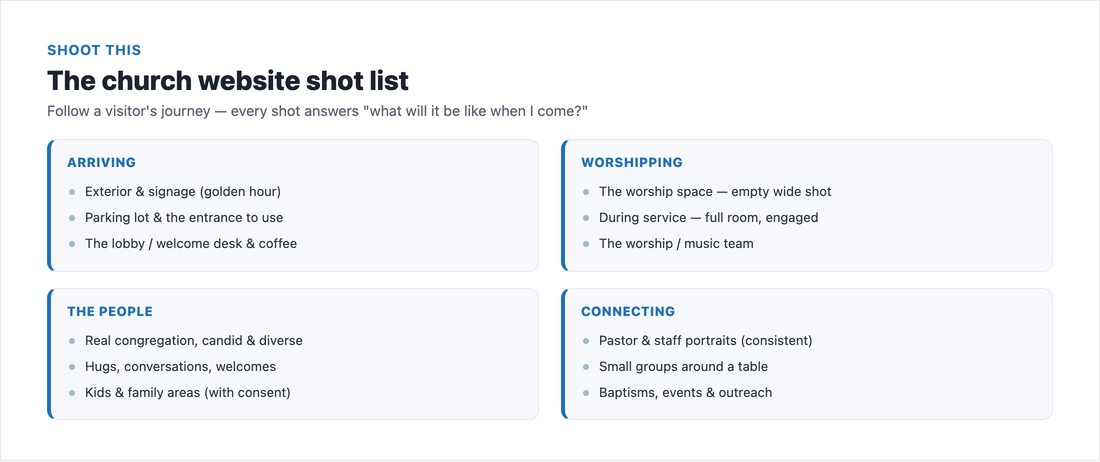
Think like a first-time visitor and shoot their whole journey. Arriving: the exterior and signage (so they recognize the building from the street), the parking lot, and which entrance to use. Walking in: the lobby or welcome desk, greeters mid-handshake, the coffee. Worship: the worship space both empty (so they see the room) and during a full, engaged service, plus the music team. The people: candid, genuinely diverse congregation shots — hugs, conversations, welcomes. Connecting: kids and family areas, consistent pastor and staff portraits, small groups around a table, and milestone moments like baptisms and events. Aim for three or four strong shots per ministry, and shoot a couple of different Sundays so the same faces don’t repeat across every page.
How to get the shots
You have three realistic routes: hire a local photographer for a focused two-to-three-hour shoot (budget roughly $150–$500, varies by market), recruit a skilled volunteer with a DSLR, or use a modern phone (portrait mode works well up close). Whichever you choose, shoot during a real, well-attended service — candid beats posed — find good, even light and avoid harsh shadows and on-camera flash, wear dark clothes and use a longer lens to stay unobtrusive in worship, and shoot horizontal for web heroes. Take far more than you need and get variety.
Consent and privacy — especially for kids
Photographing people online comes with real responsibility. Put a written photo-release / media policy in place, collect consent at membership or event check-in, and post signage that services are photographed, with a clear way to opt out (a colored wristband, or a designated unfilmed section). Minors need extra care: a parent or guardian must consent — a child can’t. Favor group or distance shots of children over identifiable close-ups, and never publish a child’s name alongside their photo or in the file name. Rules vary by location, so when in doubt, check with an attorney.
Edit and size them for the web
Give your photos one consistent look (a single light or color treatment across the set — mismatched tones read amateur), then optimize for the web. Compress every image and convert to modern WebP or AVIF format — heavy photos are the number-one cause of slow church sites (see our page-speed guide). Use the right dimensions per slot: roughly 1,920px for full-width heroes, 800–1,200px for content and cards, and a 1200×630 image for social sharing. Write descriptive alt text on every image for both accessibility and SEO (our SEO guide covers image alt text). And set a real, compelling church photo as your social-share image so links look human when someone posts them.
When stock is okay
Stock has its place — illustrating a blog post, an abstract concept, or as a stopgap before your shoot. Use it well: avoid identifiable face close-ups (lean on hands, objects, candles, an open Bible), match your real size and demographics so you’re not misleading anyone, pick images from one photographer or series for a consistent feel, and confirm the license allows commercial use. Good sources include Unsplash, Pexels, and the church-specific Lightstock — and never pull images from Google Images. But treat stock as the exception; your own photos are always the stronger choice.
📄 Free download: The Church Website Photo Shot List + Consent Guide (PDF) — the full shot list, the consent and privacy rules, and the web-size cheat sheet on one page.
The bottom line
You don’t need a pro budget to dramatically upgrade your church website’s photos — you need real faces, the right shot list, a little care with light and consent, and properly sized files. Swap the stock smiles for your actual congregation and your site instantly feels warmer, more trustworthy, and more like the church a visitor will actually find on Sunday. Make great photography part of your wider plan with our church website checklist and essential features — and for inspiration, see the photography in our best church website designs.
Frequently asked questions
Is it OK to use stock photos on my church website?
Sparingly. Stock works for blog illustrations, abstract concepts, or as a stopgap before your own shoot — but never to fake your congregation. Most people recognize stock instantly, and showing people who aren’t your church reads as misleading. When you do use it, prefer hands and objects over face close-ups, match your real demographics, and confirm a commercial license. Your own photos are always better.
What photos does a church website need?
Shoot the visitor’s journey: the exterior and signage, parking and the entrance, the lobby and welcome area, the worship space (empty and during a full service), candid shots of a diverse congregation, kids and family areas, consistent pastor and staff portraits, small groups, and milestone moments like baptisms. Aim for three to four strong shots per ministry.
How much does it cost to hire a church photographer?
Roughly $150–$500 for a focused two-to-three-hour session, depending on your market and the photographer’s experience. A skilled volunteer with a DSLR, or even a modern phone used well, can also produce great results for free — the key is shooting candidly during a real, well-attended service.
Do you need a photo release for church photos?
Yes — have a written photo-release or media policy, collect consent at membership or check-in, and post signage that services are photographed with a way to opt out. Minors need extra care: a parent or guardian must consent, favor group or distance shots of children, and never publish a child’s name with their photo. Rules vary by location, so consult an attorney if unsure.
What size should church website images be?
Use about 1,920px wide for full-width hero images, 800–1,200px for content and card images, and 1200×630 for your social-share (OG) image. Compress everything to modern WebP or AVIF format — heroes under about 300KB — and add descriptive alt text to every image for SEO and accessibility.